Water Sort Solver Guide
Water Sort Level 107 Solution
This guide turns a Water Sort Level 107 screenshot into solver-ready JSON, then into a visual step-by-step replay. It uses the exact screenshot, JSON layout, and prepared move list for this page, while still working as a template for nearby app versions.
Use the interactive replay to follow each bottle state with Next or Play instead of pausing a video walkthrough.
The fastest path is: attach the screenshot to GPT or Gemini, copy the JSON, load it into the Sort Solver, adjust preview colors if the screenshot shades look different, then replay the solution step by step. The Water Sort Level Editor is only a small optional fallback when a bottle needs manual correction.
Prefer not to pause a fast video walkthrough? Open the prepared Level 107 interactive replay and press Next or Play to follow each move with bottle previews.
Free browser replay. No install required. Works on mobile and desktop.
Step 1: Keep the Level 107 Screenshot Ready
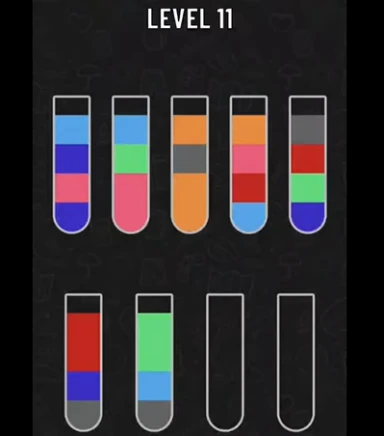
Start with the Level 107 screenshot. Do not rebuild anything yet. The quickest workflow is to give this screenshot directly to Gemini first, then compare the returned JSON against the board.
The screenshot below is the source image. Keep it open, save it, or send it directly to Gemini together with the copyable prompt in the next step.
- Use the original screenshot as the source of truth.
- Let Gemini read the board before you type anything by hand.
- You will verify the bottle order later in the solver preview.
Step 2: Copy This GPT Prompt
Attach the Level 107 screenshot to GPT, then send this prompt exactly as written. It is still a good general-purpose prompt for screenshot-to-JSON extraction.
It asks for bottom-to-top bottle arrays, numeric color IDs, and a final count check before returning JSON.
After the AI returns the JSON, paste it into the Water Sort Solver to preview the bottles, adjust colors, solve the puzzle, and replay every move visually.
- Paste the GPT prompt exactly as written.
- Attach the Level 107 screenshot in the same message.
- Copy only the raw JSON array from the answer.
- Water Sort SolverPreview the AI JSON, adjust colors, solve, and replay the bottle moves.
Convert this Water Sort puzzle screenshot into solver JSON. Target format context: The output will be pasted into https://cocos.app/tools/sort-solver for bottle preview, color count checking, color adjustment, solving, and step-by-step replay. Use this only as context for the target format. Do not include the site name, URL, or this note in your final answer. Rules: - Read bottles left to right, top row first, then bottom row. - Write each bottle from bottom to top. - Each bottle has up to 4 liquid layers. - A full bottle has exactly 4 layers. - Empty bottles = []. - Ignore only the empty dark space above the liquid. - Do not ignore liquid layers just because they are dark or close to the background. - Use numbers, not color names. - Same visible liquid color = same number. - Different visible liquid color = different number. - If one color block is double-height, repeat the same number twice. - Every number must appear exactly 4 times. - Before answering, count all numbers and fix any count that is not 4. Important color matching rules: - The same liquid color may look slightly lighter or darker because of bottle lighting, shadows, or transparency. - Compare colors by the actual liquid hue, not by brightness. - If the same color appears twice in one bottle, use the same number both times. - Before assigning final numbers, first build a visual color set for the whole puzzle. - After writing the JSON, count every number. Every number must appear exactly 4 times. Important: - Do not return the JSON until all numbers are balanced. - Return ONLY the JSON array. - No explanation. - No markdown. - No code block. Before assigning numbers, first identify the full color set visually. Do not create a new number unless it is a clearly different liquid color. If two colors are similar, compare them across all bottles before deciding. If one color appears as a double-height block, repeat the same number twice. Do not replace one of the repeated layers with a new color number.Step 3: Copy This Gemini Prompt
If you use Gemini, use this stricter version. It keeps the same Water Sort rules but makes the validation and self-correction requirements more explicit.
The key requirement is that every unique number must appear exactly four times before Gemini returns the final JSON.
After the AI returns the JSON, paste it into the Water Sort Solver to preview the bottles, adjust colors, solve the puzzle, and replay every move visually.
- Paste the Gemini prompt exactly as written.
- Attach the Level 107 screenshot in the same message.
- Copy only the raw JSON array from Gemini.
- Water Sort SolverPreview the AI JSON, adjust colors, solve, and replay the bottle moves.
Role: You are an expert data extractor for a Water Sort Puzzle solver. Task: Convert the provided screenshot of a Water Sort puzzle into a 2D JSON array. Target format context: The output will be pasted into https://cocos.app/tools/sort-solver for bottle preview, color count checking, color adjustment, solving, and step-by-step replay. Use this only as context for the target format. Do not include the site name, URL, or this note in your final answer. Setup & Baseline Reference: - The user has verified that Bottle 1 (top-left) contains exactly these layers from BOTTOM to TOP: [1, 2, 3, 2]. - This means: Layer 1 (Bottom) = Color A, Layer 2 = Color B, Layer 3 = Color C, Layer 4 (Top) = Color B. Use this bottle as your absolute color calibration baseline. Strict Extraction Rules: 1. Bottle Order: Read left to right, top row first, then middle/bottom rows. 2. Layer Order: Inside each bottle, read strictly from BOTTOM to TOP (Layer 1 to Layer 4). 3. Empty Space: Ignore empty tops. Completely empty bottles = []. 4. Double Height: If a color block is double height, record its ID twice. CRITICAL 3-STAGE PIPELINE (Execute internally before final output): Stage 1: Establish a Unique Color Palette Scan the entire image and isolate ALL distinct colors. To avoid AI color-blindness/shadow confusion, map them to explicit descriptive names. For this specific puzzle style, pay extreme attention to separate: - Dark Blue vs. Sky Blue vs. Royal Blue - Bright Yellow vs. Mustard Yellow vs. Orange - Dark Grey vs. Brown/Taupe vs. Olive Green - Pink vs. Magenta/Rose Stage 2: Assign IDs & Cross-Check Matrix Map your palette to IDs (1, 2, 3...). Re-verify that Bottle 1 perfectly matches [1, 2, 3, 2]. Fill the matrix. Stage 3: Strict Mathematical Validation (The 4-Times Rule) Count every single ID in your final grid. EVERY SINGLE UNIQUE ID MUST APPEAR EXACTLY 4 TIMES. - If an ID appears 3 or 5 times, it means you misidentified a shade (e.g., you mixed up Mustard Yellow with Orange, or Royal Blue with Dark Blue). - If this happens, you MUST trace those specific bottles, re-examine the colors under high contrast, fix the ID mapping, and recount until the total count for EVERY ID is exactly 4. Output Requirement: Once validation passes 100%, output ONLY the raw JSON array. Do not include markdown formatting, code blocks, explanations, or conversational text.Step 4: Copy the JSON Result
A correct answer should list one bottle per inner array, in left-to-right and top-to-bottom order, with each bottle written from bottom to top.
Use this Level 107 JSON as a ready-to-paste example or as a format check against the JSON returned from your own screenshot.
- Each inner array is one bottle.
- The first value is the bottom layer.
- The last value is the top layer.
- Empty bottles stay as [].
[[1,2,3,4],[5,6,7,8],[7,4,9,6],[10,8,9,1],[7,10,11,6],[1,7,3,6],[12,5,3,2],[9,5,12,8],[4,5,11,11],[2,9,10,12],[2,1,4,3],[11,12,10,8],[],[]]Step 5: Paste JSON into the Sort Solver
Open the Sort Solver, paste the Level 107 JSON, and click Load JSON. The preview is now more useful because you can click any liquid layer and adjust that numeric color ID to match the screenshot.
Use the Color Count Check before solving. Balanced counts do not prove the layout is perfect, but a warning usually means a layer was missed, duplicated, or confused with a similar shade.
If a bottle needs manual rebuilding, the Water Sort Level Editor is available as a small fallback, but the main workflow is still JSON into the Sort Solver.
- Open /tools/sort-solver.
- Paste the Level 107 JSON.
- Click Load JSON.
- Compare the preview with your screenshot and adjust display colors if needed.
- Open Sort SolverPaste JSON, preview bottles, and generate water sort solver steps.
- Read Sort Solver GuideSee the broader JSON testing and solver workflow.
Step 6: Adjust Preview Colors and Replay the Solution
After loading the Level 107 JSON, use the preview as the final check against your screenshot. If a number color looks wrong, click that liquid layer and choose a closer display color from the popover. This changes only the preview color mapping, not the JSON numbers and not the solver logic.
The Color Count Check is a quick sanity check: each numeric color ID should normally appear exactly four times. If the count warning appears, review the screenshot and JSON before you rely on the move list.
When the preview matches the screenshot, click Solve. You can play the solving process step by step, move forward or backward, and keep your adjusted preview colors throughout the replay.
- Click any liquid layer to open the Color ID popover.
- Pick a swatch or use the color input to match the screenshot more closely.
- Check the Color Count warning before solving.
- Use Previous, Next, Play, Pause, and Reset to replay the solution step by step.
Text Walkthrough for Water Sort Level 107
If you prefer reading the moves, here is the same solution as text. Bottle letters match the visual replay from left to right.
After the preview matches the screenshot, click Solve and use the Visual Step Player first. It shows Step 0 as the initial layout, then updates the bottles after every move so you can replay the answer instead of reading a long list all at once.
The end goal is simple: play the solution step by step until every bottle is sorted. The move list remains below the player for reference, and clicking any move jumps directly to that point in the replay.
I also prepared a shareable visual replay for this Level 107 board with the preview colors already matched to the screenshot. Open it if you want to see the initial layout, press Next or Play, and follow the move list as a working example before trying the JSON yourself.
This Level 107 solution was prepared in advance and solves the puzzle in 49 moves.
- Open the Level 107 visual replayPrepared share page with the bottle layout, matched preview colors, step player, and move list.
Solution found in 49 moves:Step 1: Bottle A → Bottle MStep 2: Bottle K → Bottle AStep 3: Bottle M → Bottle KStep 4: Bottle A → Bottle M (2 layers)Step 5: Bottle G → Bottle AStep 6: Bottle M → Bottle GStep 7: Bottle C → Bottle NStep 8: Bottle E → Bottle NStep 9: Bottle F → Bottle NStep 10: Bottle M → Bottle FStep 11: Bottle A → Bottle M (2 layers)Step 12: Bottle D → Bottle AStep 13: Bottle C → Bottle DStep 14: Bottle K → Bottle C (2 layers)Step 15: Bottle A → Bottle K (2 layers)Step 16: Bottle K → Bottle A (3 layers)Step 17: Bottle M → Bottle K (2 layers)Step 18: Bottle D → Bottle M (2 layers)Step 19: Bottle H → Bottle DStep 20: Bottle J → Bottle HStep 21: Bottle L → Bottle DStep 22: Bottle J → Bottle LStep 23: Bottle M → Bottle J (2 layers)Step 24: Bottle J → Bottle M (3 layers)Step 25: Bottle K → Bottle J (3 layers)Step 26: Bottle I → Bottle K (2 layers)Step 27: Bottle E → Bottle KStep 28: Bottle L → Bottle E (2 layers)Step 29: Bottle H → Bottle L (2 layers)Step 30: Bottle H → Bottle IStep 31: Bottle M → Bottle H (3 layers)Step 32: Bottle D → Bottle M (3 layers)Step 33: Bottle E → Bottle D (3 layers)Step 34: Bottle B → Bottle MStep 35: Bottle E → Bottle BStep 36: Bottle C → Bottle E (3 layers)Step 37: Bottle B → Bottle C (2 layers)Step 38: Bottle B → Bottle NStep 39: Bottle B → Bottle IStep 40: Bottle I → Bottle B (3 layers)Step 41: Bottle E → Bottle I (3 layers)Step 42: Bottle L → Bottle E (3 layers)Step 43: Bottle K → Bottle L (3 layers)Step 44: Bottle F → Bottle K (2 layers)Step 45: Bottle G → Bottle K (2 layers)Step 46: Bottle F → Bottle CStep 47: Bottle A → Bottle F (3 layers)Step 48: Bottle G → Bottle BStep 49: Bottle E → Bottle G (3 layers)Why this is easier than pausing a video
A video walkthrough can be hard to follow because you need to pause at the exact moment and compare the board manually. The interactive replay keeps the move list and bottle preview together, so you can press Next, go back with Previous, or use Play to watch the solution at your own pace.
Water Sort Level 107 Tips
This board is deep enough that one wrong merge can hide the color you need for several turns.
If your JSON does not solve, the first thing to check is still bottle order. Most failures come from one bottle being entered top-to-bottom instead of bottom-to-top.
- Keep both empty bottles available for rescue moves.
- Use the preview to confirm bottle order before solving.
- Be careful with repeated colors that look almost identical in dark screenshots.
- If the answer looks different, check whether Gemini compressed or split one color block incorrectly.
If your bottle layout looks different
Water Sort levels can vary between apps, updates, and cloned versions. If your layout looks different, paste your own JSON into the Visual Water Sort Solver to create a custom replay for your version.
- Open the Visual Water Sort SolverPaste your own layout, adjust preview colors, solve, and create a custom replay link.
Water Sort Level 107 FAQ
This page uses the Level 107 screenshot, JSON, and move list prepared for this guide. If your app version shows a different board, convert your own screenshot into JSON first and compare the solver preview.
Numbers make screenshot extraction more reliable because the model only has to keep each color ID consistent. After loading the JSON, you can click a liquid layer in the solver preview and adjust that number color so the display matches your screenshot without changing the JSON.
A standard water sort level has four layers for each color. If one number appears three times and another appears five times, Gemini probably missed a layer, split a double-height block, or confused two similar colors.
The solver treats each bottle as a stack. The first value is the bottom layer, and the last value is the top layer that can be poured first.
Use the solver preview to compare the JSON against the screenshot. If one bottle is wrong, fix that bottle before solving. Do not solve until the preview matches the board.
Compare them across all bottles before assigning labels. Do not create a new number unless it is clearly a different visible liquid color, and do not ignore a dark layer just because it is close to the background.
They are the bottle labels shown by the solver preview. A move such as A -> M means pour from bottle A into bottle M.
Yes, but only as an optional fallback. For Level 107, start with GPT or Gemini JSON and the Sort Solver preview first. Use the editor only when one bottle needs manual correction or you want to test a custom variation.
Check the JSON first: bottle order should be bottom-to-top, empty bottles should be [], every full bottle should have four layers, and every number should appear exactly four times.
No. This guide includes a visual replay link. Open the replay and use Next, Previous, or Play to follow the move list with bottle previews instead of pausing a video walkthrough.