Water Sort Solver Guide
Water Sort Level 11 Solution
This Water Sort Level 11 guide gives you the exact screenshot workflow for this page: read the bottle layout, turn it into solver-ready JSON, load it into the Sort Solver, and replay the 23-move solution.
Use the prepared replay if you want to follow the moves with Next or Play instead of pausing a video walkthrough.
The page is based on the Level 11 screenshot and solver output shown here. If your app version has a different bottle layout, use the same prompt with your own screenshot and verify the preview before solving.
Open the prepared Level 11 interactive replay and press Next or Play to follow each move with bottle previews.
Free browser replay. No install required. Works on mobile and desktop.
Step 1: Keep the Level 11 Screenshot Ready
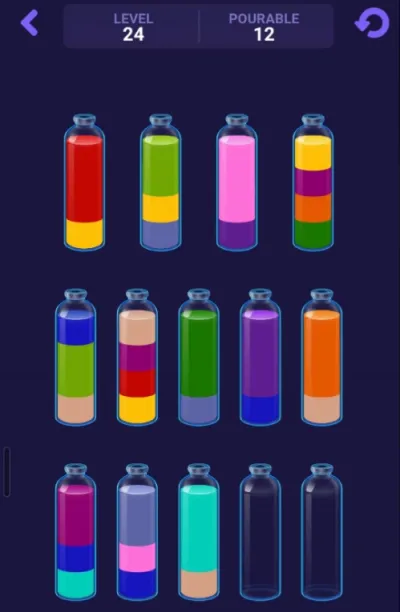
Start with the Level 11 screenshot. Do not type the board by hand first; use the screenshot as the source image and let the prompt produce the first JSON draft.
The screenshot below is the board used for this guide. Keep it open while you compare the AI JSON against the solver preview.
- Read bottles from left to right.
- Write each bottle from bottom to top after extraction.
- Keep the two empty bottles as [] in the JSON.
- Use the preview screenshot later to confirm the bottle order.
Step 2: Copy This GPT Prompt
Attach the Level 11 screenshot to GPT, then send this prompt. It asks for bottom-to-top bottle arrays, numeric color IDs, and a final color-count check before returning JSON.
Copy only the raw JSON answer. Extra explanation or markdown can make the solver input harder to paste cleanly.
- Attach the Level 11 screenshot in the same message.
- Ask for raw JSON only.
- Check that every number appears exactly four times before solving.
- Water Sort SolverPreview the JSON, adjust colors, solve, and replay the bottle moves.
Convert this Water Sort puzzle screenshot into solver JSON. Target format context: The output will be pasted into https://cocos.app/tools/sort-solver for bottle preview, color count checking, color adjustment, solving, and step-by-step replay. Use this only as context for the target format. Do not include the site name, URL, or this note in your final answer. Rules: - Read bottles left to right, top row first, then bottom row. - Write each bottle from bottom to top. - Each bottle has up to 4 liquid layers. - A full bottle has exactly 4 layers. - Empty bottles = []. - Ignore only the empty dark space above the liquid. - Do not ignore liquid layers just because they are dark or close to the background. - Use numbers, not color names. - Same visible liquid color = same number. - Different visible liquid color = different number. - If one color block is double-height, repeat the same number twice. - Every number must appear exactly 4 times. - Before answering, count all numbers and fix any count that is not 4. Important color matching rules: - The same liquid color may look slightly lighter or darker because of bottle lighting, shadows, or transparency. - Compare colors by the actual liquid hue, not by brightness. - If the same color appears twice in one bottle, use the same number both times. - Before assigning final numbers, first build a visual color set for the whole puzzle. - After writing the JSON, count every number. Every number must appear exactly 4 times. Important: - Do not return the JSON until all numbers are balanced. - Return ONLY the JSON array. - No explanation. - No markdown. - No code block. Before assigning numbers, first identify the full color set visually. Do not create a new number unless it is a clearly different liquid color. If two colors are similar, compare them across all bottles before deciding. If one color appears as a double-height block, repeat the same number twice. Do not replace one of the repeated layers with a new color number.Step 3: Copy This Gemini Prompt
If you use Gemini, this shorter validation prompt keeps the same Level 11 rules and uses Bottle 1 as a color calibration baseline.
The important part is the same: every color ID must appear exactly four times before the JSON is treated as ready.
- Use Bottle 1 as the baseline: [2, 3, 2, 1].
- Keep similar visible colors under consistent IDs.
- Return only the JSON array.
- Water Sort SolverLoad and check the JSON before solving.
Role: You are an expert data extractor for a Water Sort Puzzle solver. Task: Convert the provided screenshot of a Water Sort puzzle into a 2D JSON array. Target format context: The output will be pasted into https://cocos.app/tools/sort-solver for bottle preview, color count checking, color adjustment, solving, and step-by-step replay. Use this only as context for the target format. Do not include the site name, URL, or this note in your final answer. Setup & Baseline Reference: - The user has verified that Bottle 1 (top-left) contains exactly these layers from BOTTOM to TOP: [2, 3, 2, 1]. - This means Bottle 1 is the calibration baseline. Keep the same visible color under the same number across the full puzzle. Strict Extraction Rules: 1. Bottle Order: Read left to right, top row first, then bottom row. 2. Layer Order: Inside each bottle, read strictly from BOTTOM to TOP. 3. Empty Space: Ignore empty tops. Completely empty bottles = []. 4. Double Height: If a color block is double height, record its ID twice. Validation: Count every single ID in your final grid. Every unique ID must appear exactly 4 times. If one ID appears 3 or 5 times, re-check similar colors and fix the mapping before returning the answer. Output Requirement: Once validation passes, output ONLY the raw JSON array. Do not include markdown formatting, code blocks, explanations, or conversational text.Step 4: Copy the Level 11 JSON Result
Use this Level 11 JSON as the ready-to-paste example for the screenshot on this page. Each inner array is one bottle, and each bottle is written from bottom to top.
The final two empty bottles are important because the solver needs that free space to move blocked colors.
- Bottles A to G contain the liquid layers.
- Bottles H and I are empty: [].
- Color IDs 1 through 7 each appear exactly four times.
- The first value in each bottle is the bottom layer.
[[2, 3, 2, 1],[3, 3, 4, 1],[5, 5, 6, 5],[1, 7, 3, 5],[2, 4, 7, 6],[6, 2, 7, 7],[6, 1, 4, 4],[],[]]Step 5: Paste JSON into the Sort Solver
Open the Sort Solver, paste the Level 11 JSON, and click Load JSON. The preview should show seven filled bottles and two empty bottles.
Use the loaded preview as the first verification step. Balanced color counts help, but the bottle order still needs to match the screenshot before the move list is useful.
- Open /tools/sort-solver.
- Paste the Level 11 JSON.
- Click Load JSON.
- Compare the preview with the original screenshot.
- Open Sort SolverPaste JSON, preview bottles, and generate water sort solver steps.
- Read Sort Solver GuideSee the broader JSON testing and solver workflow.
Step 6: Check the Preview and Replay the Solution
After loading the Level 11 JSON, click Solve. The solver output for this board finds a 23-move route, and the visual step player can replay the board state after each pour.
If the preview color mapping looks different from the screenshot, adjust only the display colors in the preview. That does not change the JSON numbers or the solver logic.
- Use Color Count Check before solving.
- Use Previous, Next, Play, Pause, and Reset to follow the replay.
- Open the share page when you want the prepared visual replay instead of rebuilding the board.
Text Walkthrough for Water Sort Level 11
Here is the same Level 11 solution as a text move list. The bottle letters match the solver preview from left to right: A is the first bottle, B is the second, and so on.
Use the visual replay first if possible. The text list is useful for checking a single move, but the replay keeps the changing bottle state visible after every pour.
This prepared Level 11 board solves in 23 moves.
- Open the Level 11 visual replayPrepared share page with the bottle layout, step player, and move list.
Solution found in 23 moves:Step 1: Bottle F -> Bottle H (2 layers)Step 2: Bottle G -> Bottle I (2 layers)Step 3: Bottle A -> Bottle GStep 4: Bottle A -> Bottle FStep 5: Bottle B -> Bottle GStep 6: Bottle B -> Bottle IStep 7: Bottle B -> Bottle A (2 layers)Step 8: Bottle A -> Bottle B (3 layers)Step 9: Bottle A -> Bottle FStep 10: Bottle F -> Bottle A (3 layers)Step 11: Bottle E -> Bottle FStep 12: Bottle E -> Bottle HStep 13: Bottle E -> Bottle IStep 14: Bottle A -> Bottle E (3 layers)Step 15: Bottle G -> Bottle A (3 layers)Step 16: Bottle F -> Bottle G (2 layers)Step 17: Bottle C -> Bottle FStep 18: Bottle C -> Bottle GStep 19: Bottle C -> Bottle F (2 layers)Step 20: Bottle D -> Bottle FStep 21: Bottle D -> Bottle BStep 22: Bottle D -> Bottle HStep 23: Bottle A -> Bottle D (3 layers)Why this is easier than pausing a video
A video walkthrough forces you to pause at the right moment and mentally compare the board. The interactive replay keeps the move list and bottle preview together, so you can move one step at a time or replay the answer at your own pace.
Water Sort Level 11 Tips
Level 11 is still early enough that the two empty bottles give you room to recover, but a reversed bottle can still break the solution. Check the bottom-to-top order before you trust the move list.
The first useful unlock is to move the paired top stack from Bottle F into an empty bottle, then free space from Bottle G. That gives the solver enough room to build complete color groups.
- Keep both empty bottles available at the start.
- Do not reverse the bottle arrays when copying JSON.
- Move same-color stacks together when the target bottle is empty or already has that color on top.
- If the solver fails, check color counts and bottle order before changing the move list.
If your bottle layout looks different
Water Sort levels can vary between apps, updates, and cloned versions. If your Level 11 board does not match the screenshot here, paste your own screenshot-derived JSON into the Visual Water Sort Solver and create a replay for that version.
- Open the Visual Water Sort SolverPaste your own layout, adjust preview colors, solve, and create a custom replay link.
Water Sort Level 11 FAQ
This page uses the Level 11 screenshot, JSON, and move list prepared for this guide. If your app version shows a different board, convert your own screenshot into JSON first and compare the solver preview.
Paste the bottle arrays shown in this guide, with each bottle written from bottom to top. For this board, bottles H and I are empty arrays, and color IDs 1 through 7 each appear exactly four times.
Numbers make screenshot extraction easier to validate. The solver only needs consistent color IDs, and you can adjust the display colors later so the preview looks closer to the screenshot.
It means pour from bottle F into bottle H. The letters match the bottle labels in the solver preview, counted from left to right.
No. This guide includes a prepared visual replay link. Open it and use Next, Previous, or Play to follow each move with bottle previews instead of pausing a video.
Check the JSON first. Make sure each bottle is bottom-to-top, empty bottles are [], every full bottle has four layers, and each color ID appears exactly four times.
Yes, but it is optional. Start with the screenshot-to-JSON workflow and solver preview. Use the editor only if one bottle needs manual correction or if your Level 11 layout is different.